
Ragify: corporate AI knowledge layer
From scattered documents to a unified knowledge base: bots, knowledge bases, access rights, and dialogues all reside within a single system, and employees receive answers with links to the original documents.

Why is a separate knowledge layer needed
Corporate knowledge is usually scattered: regulations in an EDMS, presentations on a file server, product terms in contracts, and expert answers in email correspondence. An employee searches through folders, finds an outdated version, and still ends up asking a colleague.
Ragify compiles these documents into a managed knowledge base and deploys an AI assistant on top of it. Responses are generated not from the open internet, but from a verified corporate document set—and always include a reference to the source file.
The product is developed by Invent, a company of the RESTART group; the product's separate website is— ragify.ruRESTART is responsible for implementing data sources, integrations, information security, and operations within the corporate environment.
Administrator workspace: bots
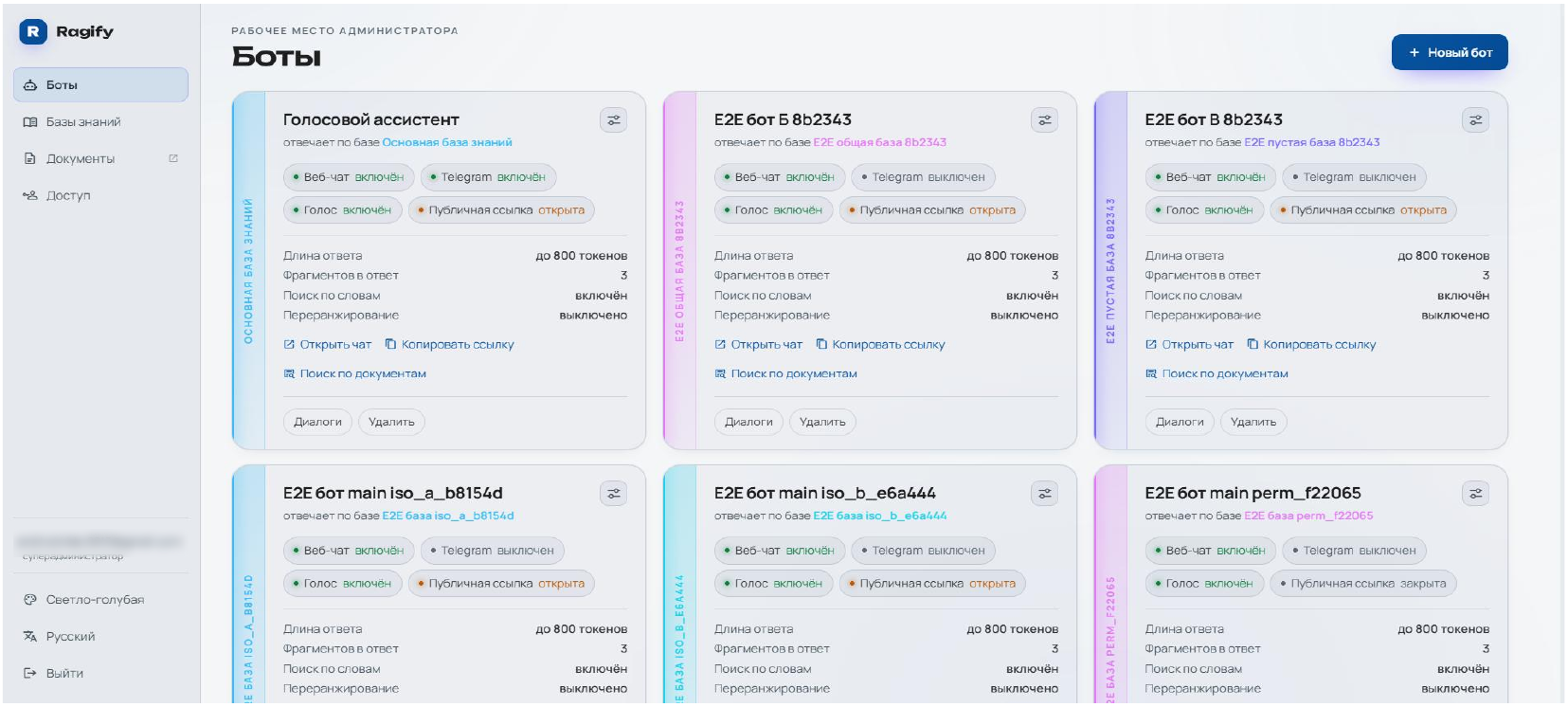
The administrator sees all organization bots as cards: which knowledge base the bot is linked to, which channels are enabled, and how it is configured for search and response.
Channels
Web chat, Telegram, voice mode, and public link can be enabled separately for each bot—the link can be opened or closed.
Response parameters
The card immediately shows the response length (e.g., up to 800 tokens) and how many database fragments are fed into the model.
Search mode
It is visible whether additional word search is enabled and whether result reranking is used.
Dialogues
From the card, the chatbot opens, a link to it is copied, and user dialogues are viewed.
Bot setup: what exactly is being configured
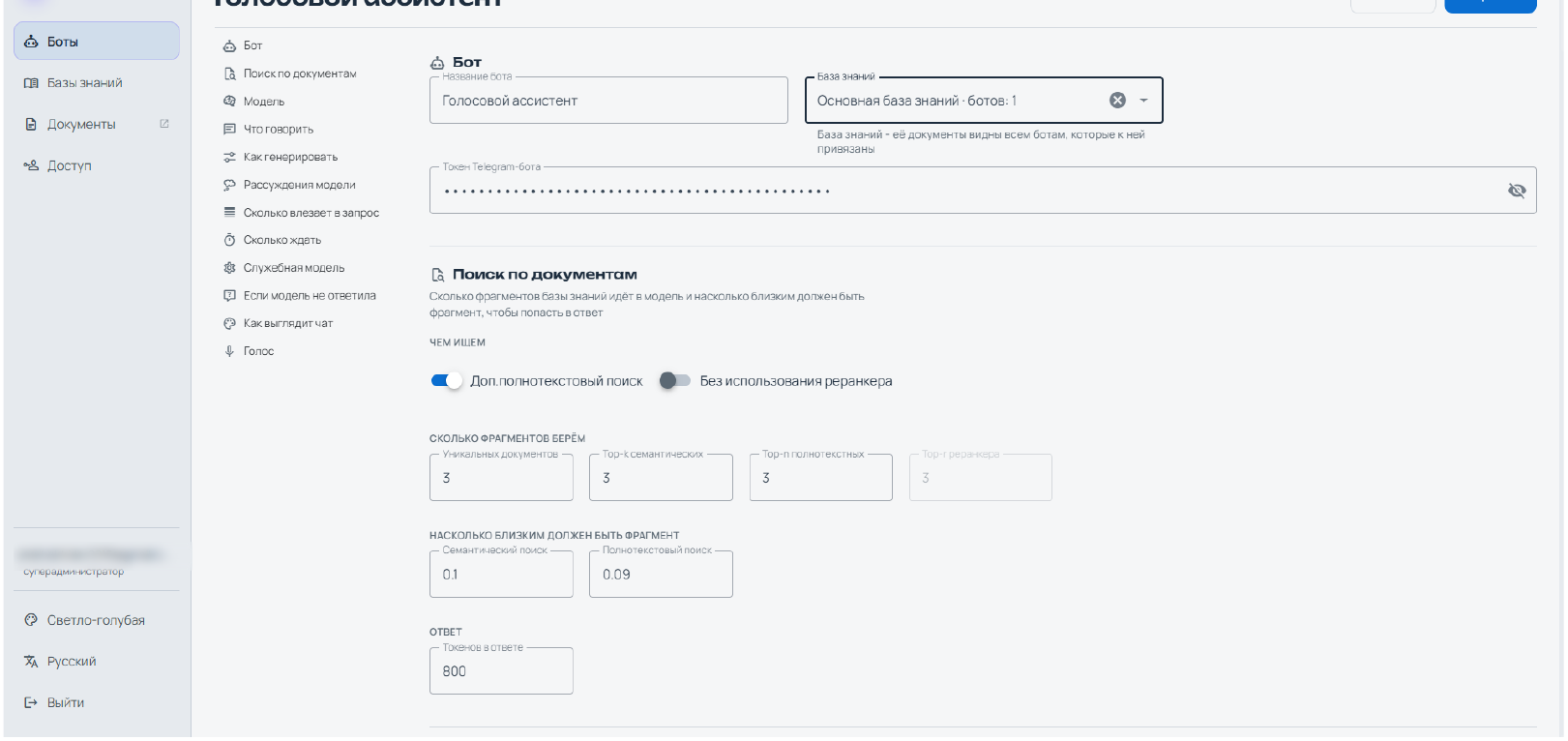
Each bot is configured separately: its own knowledge base, its own model, its own response style, and its own search parameters. The settings sections are arranged step by step—bot, document search, model, what to say, how to generate, model reasoning, request size, timeouts, utility model, behavior when no answer is found, chat appearance, and voice.
What are we searching with
Semantic search, additional full-text search, and optional reranker are enabled via switches.
How many fragments are we taking
The number of unique documents, top-k semantic results, top-n full-text results, and top-r reranker results are specified separately.
How close should the fragment be
Relevance thresholds are set separately for semantic and full-text search—weak fragments are excluded from the response.
Response length and style
Token limit in the response, instructions for "what to say" and "how to generate," behavior if the model did not find an answer.
The practical purpose of these settings is straightforward: the same knowledge base for support staff and lawyers is configured differently—sometimes a short answer from an instruction is needed, sometimes a full quote with several sources.
Knowledge bases: one base — multiple bots
A knowledge base is an independent entity with its own storage, update mode, and search type. Multiple bots can use a single knowledge base, each according to its own scenario, and the documents in the base are visible to all bots linked to it.
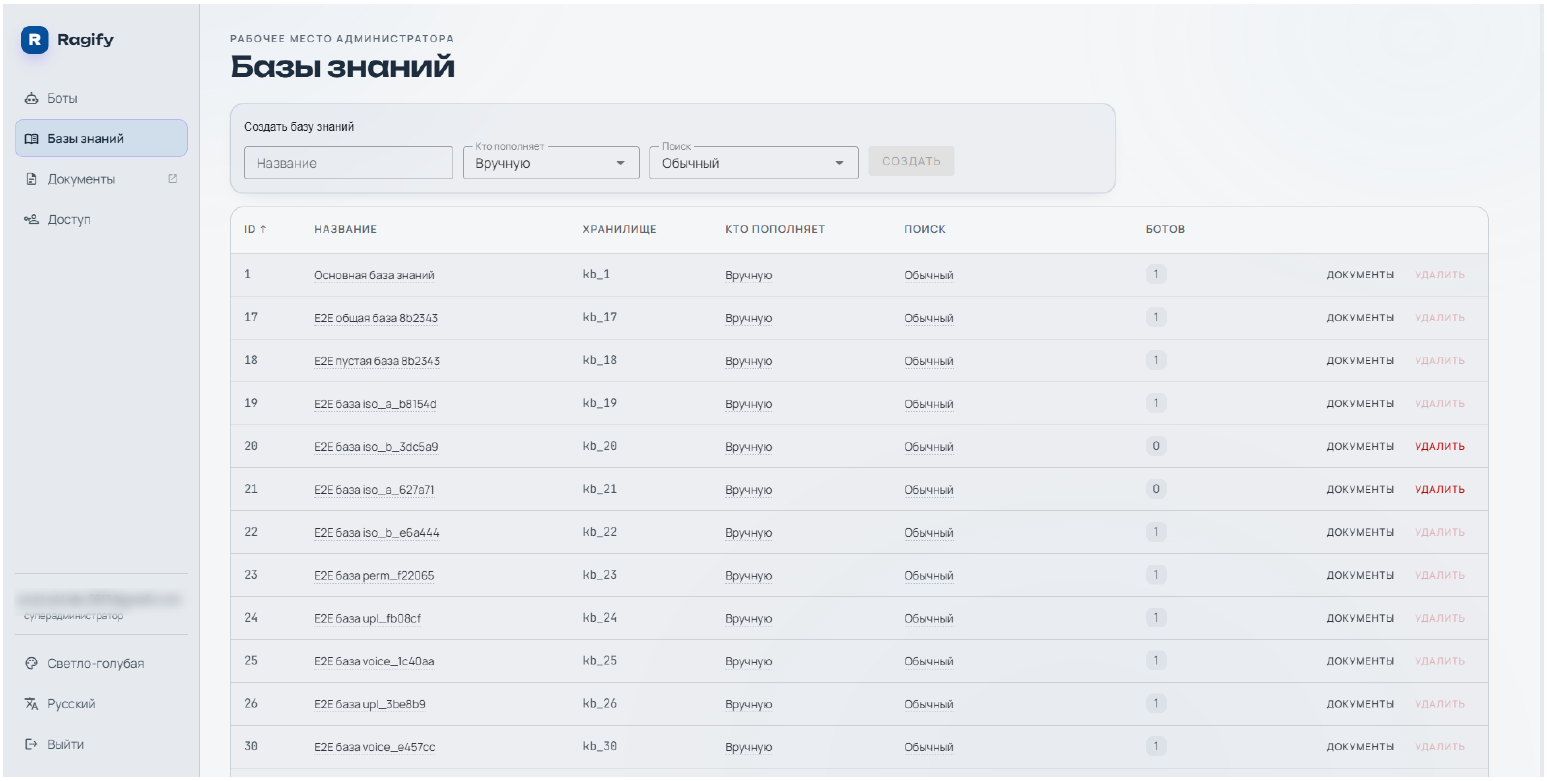
This separation resolves a common problem: there's no need to duplicate documents for each chat scenario. Guidelines are uploaded once, and the support assistant, onboarding assistant, and external public bot all work with the same verified set.
Document upload: OCR and table recognition
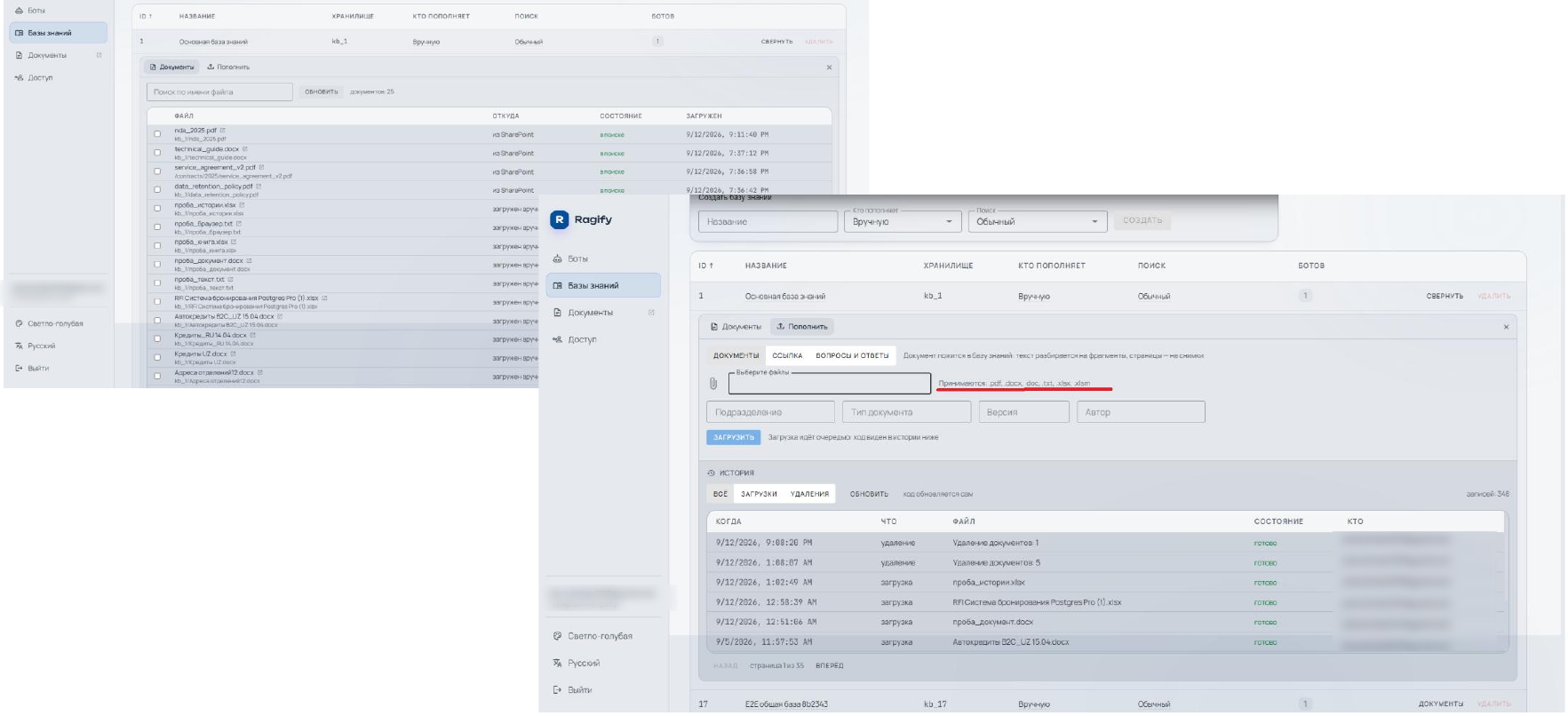
Documents are uploaded directly into the knowledge base—manually or from a connected source (e.g., SharePoint). Upon upload, text is parsed into fragments, OCR and table recognition are applied, and common office formats are supported: txt, docx, pdf, xlsx, csv, html.
Sources
Manual file uploads, document links, ready-made question-answer pairs, and connected repositories like SharePoint.
Document attributes
Department, document type, version, and author—these make it clear whose regulation it is and how up-to-date it is.
Processing status
You can see which file is already being searched and which one is still being processed: uploads proceed in a queue.
History
Separate log of uploads and deletions: when, what, which file, and who performed the action.
Authorizations: SAP-style access model
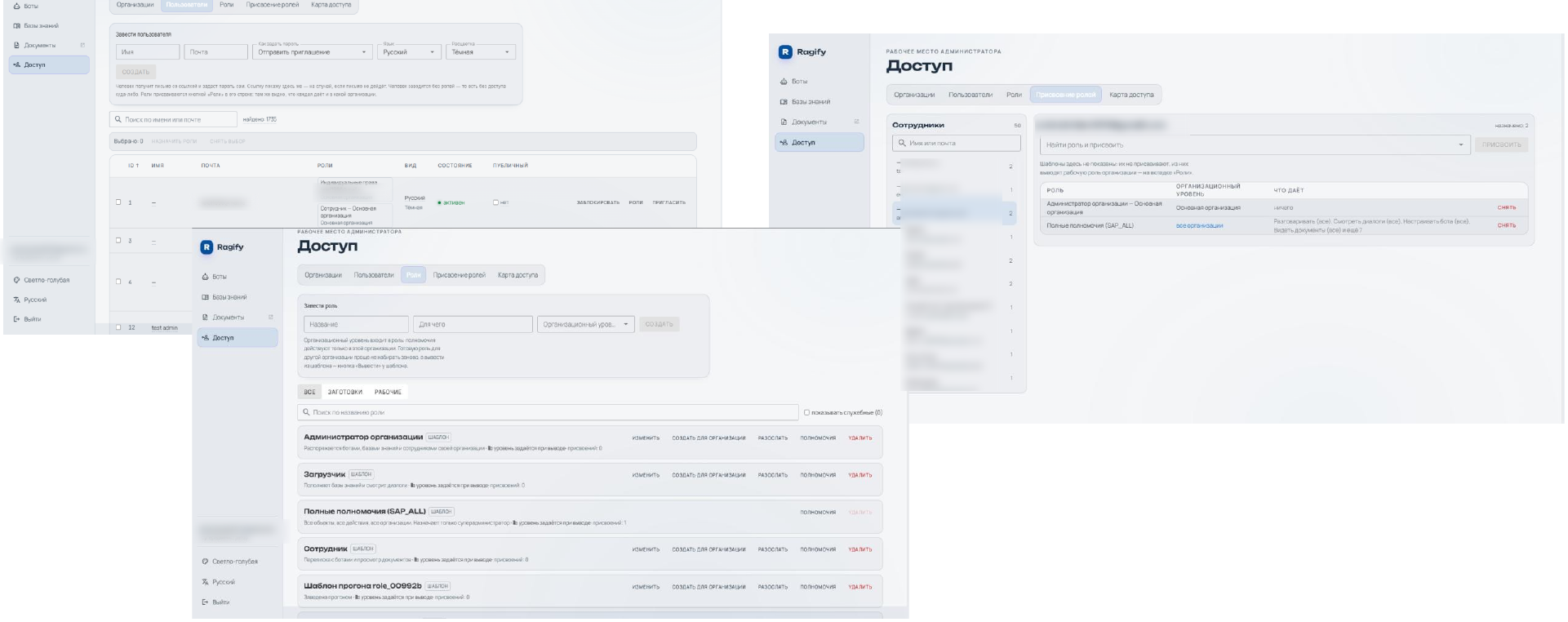
The authorization system is designed based on the role model of a large corporate system: there are organizations, users, role templates, role assignments, and an organizational level at which a role is effective.
Role templates
Organization administrator, loader, employee, full authorizations (SAP_ALL), and custom roles created from a template.
Organizational level
The role operates within a specific organization; for another organization, it's easier to create a separate role from the same template.
What the role provides
When assigning, the description is visible: talk to bots, view dialogues, configure bots, view documents.
User invitation
The user is created via email with a link to set the password; the interface language and theme are set immediately.
The screenshots have test account addresses hidden—this is a product demo environment, not real customer data.
Access map: who and through which channel
The access map consolidates permissions into a single, clear chain: bot → knowledge base → channels and their authorized users. This answers the question typically asked by the information security team: who exactly access rights corporate documents and through what.
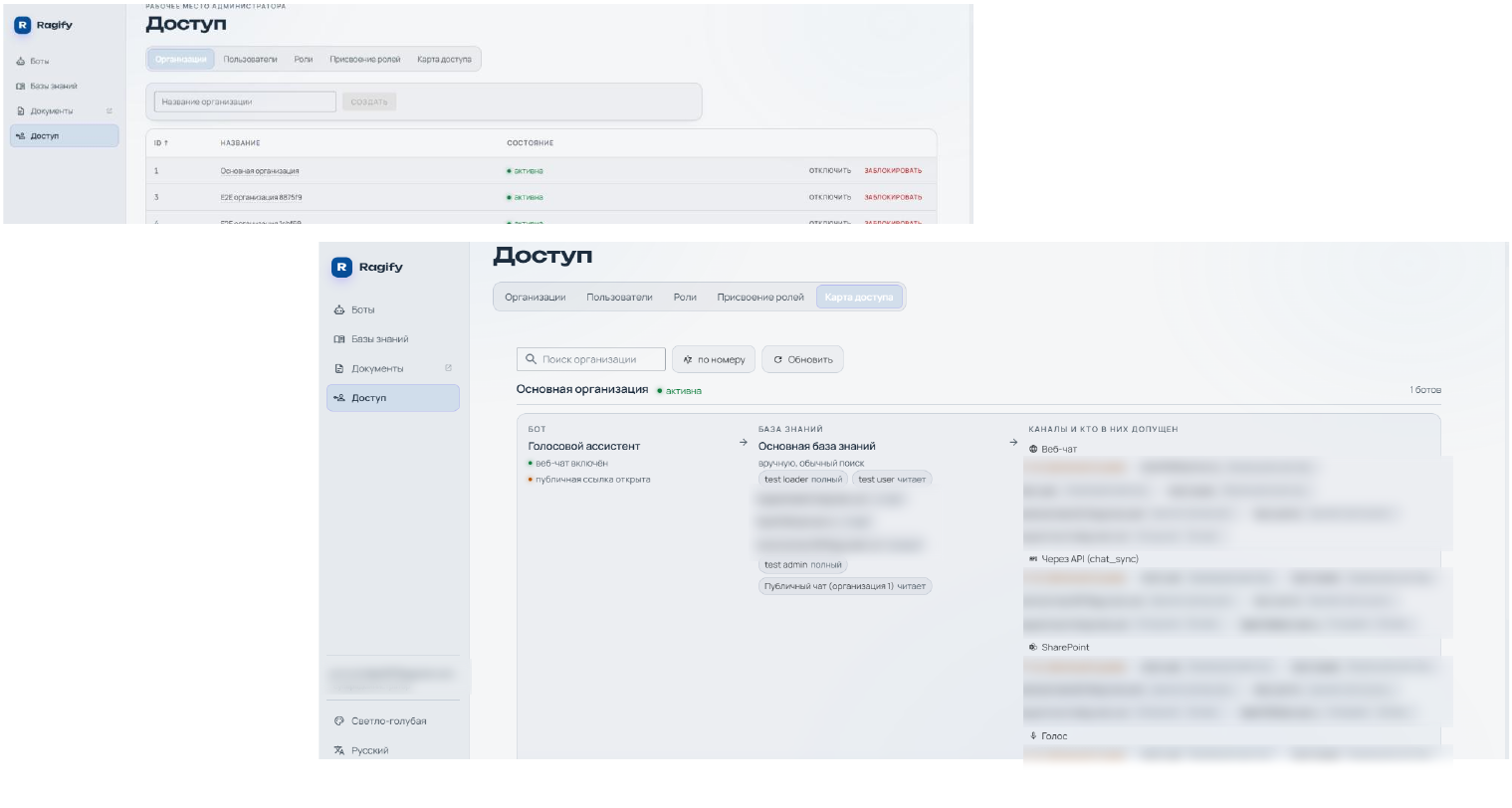
Here you can also see whether the bot is open via a public link and what permissions each participant has: full access or read-only. Permissions can be viewed and changed at the organization structure level, rather than searching for them in individual bot settings.
Chat: reply with a link to the document
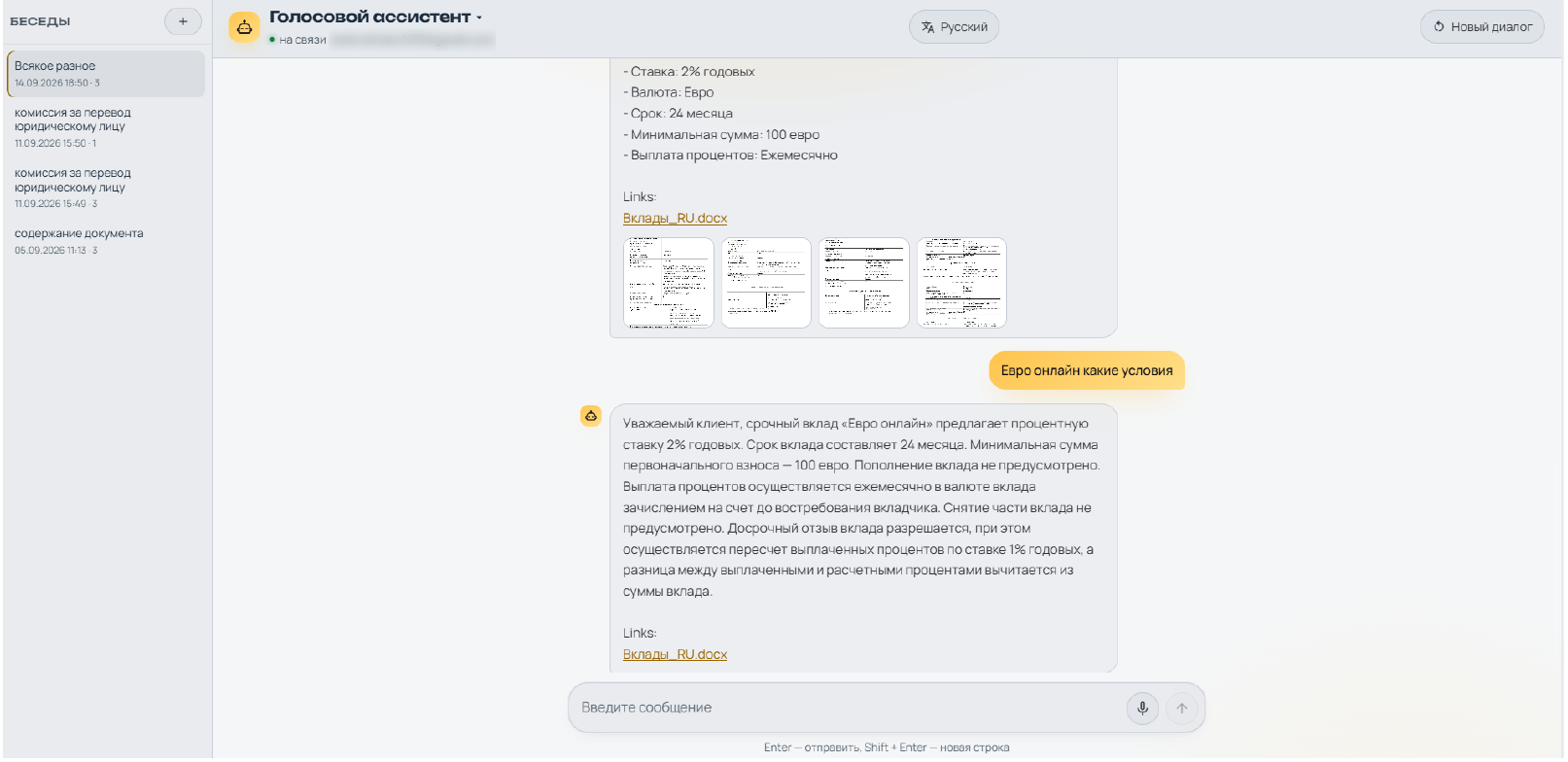
The user interface is a standard chat with conversation history. The assistant responds based on corporate documents and includes links to source files and previews of the pages used to generate the response. Communication can be via text or voice.
Grounds for the response
Below the answer is a link to the source document: you can see where the wording came from and open the original.
Chat history
Dialogs are saved and can be renamed: you can return to a previous document analysis.
Voice
Voice input and voice response — a scenario for those who don't work at a desk.
Public and internal mode
The same bot can be internal or accessible via a public link — the administrator decides.
Channels, integrations and deployment
The assistant lives where employees already work: web chat on the portal, Telegram bot, voice mode and public link for external audiences. There is an API for embedding into your own interfaces, and documents are pulled from corporate repositories - for example, from SharePoint.
Where does the bot answer?
Web chat, Telegram, voice mode, public link - enabled for each bot separately.
Embedding
Accessing the bot from your interfaces and services; Access to the channel is also controlled by rights.
Where are the documents from?
Manual upload, document link, question-answer pairs, connected repositories like SharePoint.
Where does he/she work
On-prem, private cloud, or hybrid — chosen based on data and cybersecurity requirements.
On the implementation side, RESTART builds an integration layer tailored to the customer's landscape: portals and 1C-Bitrix, Confluence and internal wikis, ECM and Service Desk, ERP on 1C and SAP, file storages, and internal APIs—so that the knowledge base is populated automatically from operational systems rather than manually.
Interface: Themes and Languages
The workspace and chat are customized according to the company's habits: several color themes (dark, light, yellow-white, and light blue "like in ERP") and interface language switching—Russian, English, Uzbek—with the list expanding.
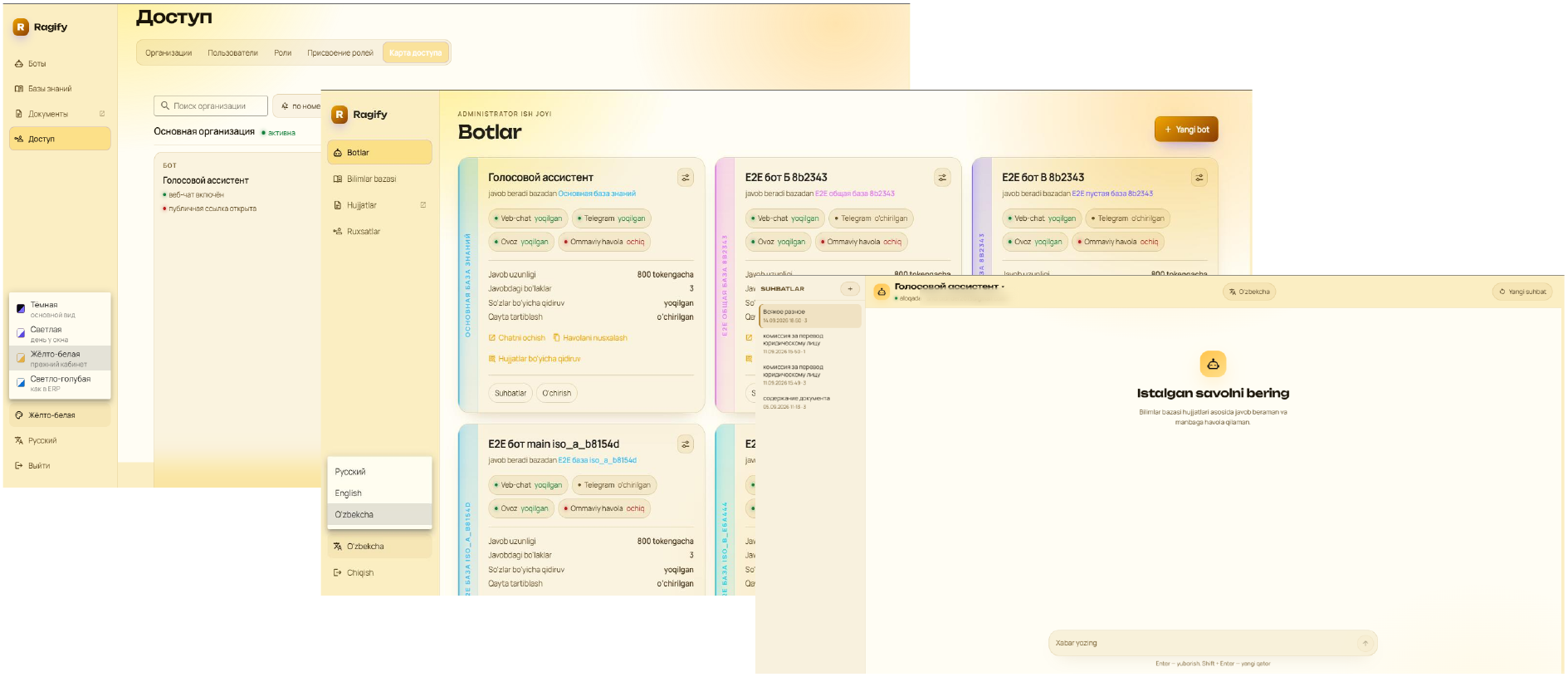
For distributed teams, this isn't just cosmetics: a user-language interface reduces support queries, and a unified theme matching the corporate system makes the assistant feel like "their own" app rather than a third-party service.
What does this give to the business
Search for knowledge faster
The employee receives a response within seconds and sees the source, instead of going through folders and colleagues.
Less burden on experts
Standard questions are handled by the knowledge base, while experts step in for truly complex cases.
Version relevance
Documents are stored in a managed version-controlled database with authors, not in dozens of personal folders.
Controlled access
Permissions are visible on the access map, rather than being pieced together from individual bot settings.
Safety and Operation
For closed loops, Ragify is deployed considering document access rights, personal data requirements, source isolation, logging, and data update policies. The architecture is selected according to the customer's requirements: on-prem, private cloud, or hybrid.
Roles and access rights
Separation of users, administrators, uploaders, and data owners linked to the organization.
Magazines
Document upload and deletion history, user conversations, bot settings changes.
Data control
Working with permitted sources, storage rules, anonymization, and personal data restrictions.
Support
Operating procedures, monitoring, updates, SLA, and knowledge base development after the pilot.
Pilot and implementation
Scenario selection
Define the business task, process owner, document sources, information security constraints, and success criteria.
Loop assembly
Setting up the environment, uploading documents, configuring knowledge bases, bots, roles, and channels.
Checking the effect
We're running real user queries, verifying answers against sources, and fine-tuning search and prompts.
production launch
We are formalizing the architecture, policies, access rights, training, and the roadmap for expansion to adjacent processes.
The best Ragify pilot involves 200–1000 documents from a single subject area and a clear user group: support, legal department, project office, HR, information security, or a product knowledge base.
Frequently asked questions
Is it possible to start with the pilot?
Yes. A practical format is a pilot on one process and a limited database of documents in 4-6 weeks with measurable criteria.
Ragify shows answer sources?
Yes. The response includes a link to the source document, and the settings specify how many fragments are sent to the model.
Can the system operate in a closed loop?
Yes. The deployment option is selected according to customer requirements: on-prem, private cloud or hybrid.
How are rights delineated?
Through organizations, role templates, and role assignments at the organizational level; the resulting picture is visible on the access map.
What document formats are supported?
Common office formats: txt, docx, pdf, xlsx, csv, html; OCR and table recognition work upon upload.
One bot or several?
Usually several: each has their own scenario and settings, but a shared knowledge base to prevent document duplication.
How RESTART develops knowledge-based assistants for customer processes: development of a corporate chatbot and AI assistant.
Request a demo or pilot
We will show the product on your environment and offer a pilot format with a clear output result.